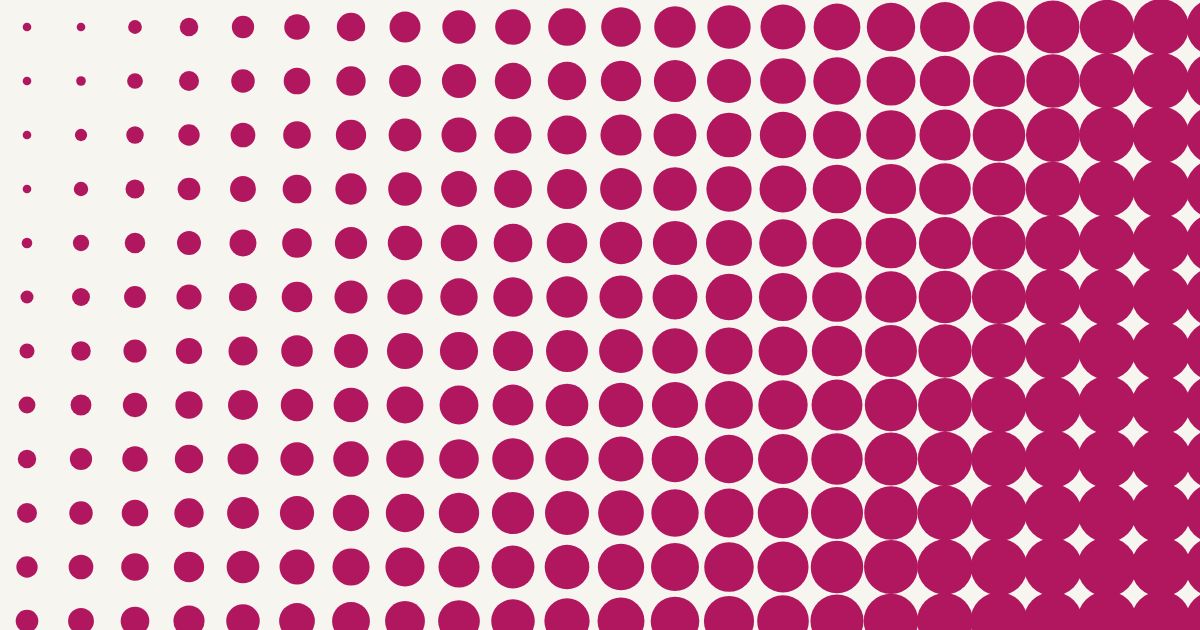
A gradient in one colour does not need a second colour. Print dots that are small where the picture is light and big where it is dark, and your eye reads a smooth fade. The shape of the dot, and a few settings, decide how it looks and how it prints.
How a halftone gradient works
The ink is either there or it is not, so the tone comes from how much of the paper the dots cover. Half way along the fade the shapes cover about half as much area as at the dark end. That is what a halftone is supposed to do. The size of the dots changes; the colour stays one.
Which shape for which look
- Round dot: the classic halftone, as in comics, posters and screen prints.
- Oval: softer and directional: it follows the angle you set, which suits fades that should feel like movement.
- Square: bold and graphic, and it joins into a solid at the dark end.
- Diamond: a square turned 45°, a favourite for textile and wallpaper looks.
- Line: stripes that swell and thin, close to an engraving or a lino print.
- Triangle and cross: for decorative and pattern work.
Where you use it
- Posters: a radial fade makes a glow or a sun from a single colour.
- T-shirts: a chest print that fades into the fabric instead of ending in a hard edge.
- Wallpaper and textile: diamonds, squares or lines in a repeat, with a mirror fade for a soft band.
- Comics and pop art: a dotted background behind a speech bubble, the Ben-Day look.
What printers say about the shapes
Trade sources name round, square, diamond and elliptical as the common shapes, and diamond and elliptical as the better choices for screen printers (Screen Printing magazine). The reason is the midtones, where neighbouring dots touch. Square dots give the largest jump there, round dots move the join up towards the shadows, and elliptical dots split it in two (Screen Printing magazine, a prepress forum thread). Elliptical dots are also directional, so they depend on the screen angle, and at a low line screen they can chain into visible lines in the midtones (a prepress forum thread). That is a forum discussion, so treat the numbers as a guide and test on your own mesh and ink.
Dots as a pop-art effect: Ben-Day
Many people who search for this are after the comic-book look. Ben-Day dots, invented in 1879, are small dots of uniform size and spacing (Public Delivery). A halftone is a different thing: its dots vary in size to follow a picture. Roy Lichtenstein enlarged and exaggerated the dot idea in his paintings, and Sigmar Polke used halftone dots themselves, blown up until they are easy to see (Studio International, Wikipedia). A gradient maker gives you the halftone version, with the dot size following your fade.
Make it with the halftone gradient maker
- Choose a source: a gradient you draw, a picture of your own, or both.
- Pick a shape from the seven above.
- Pick the kind of gradient: linear, radial, mirror or sweep.
- Drag on the picture to set where the pattern is lightest and where it is darkest.
- Tune it: cell size (how coarse), angle, stagger rows, smallest and largest shape, and a curve that makes the middle darker or lighter.
- Download a PNG, or an SVG that stays sharp at any size.
It is free, one colour, and nothing is uploaded: it runs in your browser. Open the halftone gradient maker.
A smoother fade, or a bolder one
- Smoother: a smaller cell size, Smallest at 0% so the light end disappears completely, and a curve a little above 1 if the middle looks too dark.
- Bolder: a bigger cell size, fewer rows, and the square or the diamond.
If you screen print it
- Keep the cell coarser than your mesh can hold. If the dot pattern and the mesh pattern meet, you get moiré. Check what your mesh can hold in the mesh to LPI calculator and read how to prevent moiré.
- Expect the midtones to fill in. Dot gain is largest in the midtones, and a knit can gain 15 to 35% (see one design, three surfaces). Leave room, and print a test.
- Mind the angle: see why 22.5° and never 45°.
- The gradient maker makes artwork, not a film. For a film with the dot size worked out for your mesh, with registration marks, use the film tool.
Common questions
How do I make a one-colour gradient from dots?
Use a halftone: dots that are small where the fade is light and big where it is dark. In the halftone gradient maker you pick a shape, drag across the picture to set the fade, and download a PNG or SVG.
Which dot shape is best for screen printing?
Trade sources point to diamond and elliptical dots for screen printers, because they smooth the midtone join. Round is the classic, square is the boldest. Test the one you pick on your own mesh and ink.
What is the difference between Ben-Day dots and halftone dots?
Ben-Day dots have a fixed size and spacing. Halftone dots vary in size to follow a picture or a gradient.
Can I use my own picture?
Yes. Load a PNG or JPEG and it becomes a one-colour halftone in the shape you choose. A gradient can fade it in or out.
Is the halftone gradient maker free?
Yes: one colour, all shapes, PNG and SVG, no sign-up. Several inks in one design is what the film tool is for.
Make a gradient from dots
Pick a shape, drag across the picture, download. Free, in your browser.
Built by a screen printer, for screen printers. What you tell us decides what gets built next. Write a review · Send an idea